
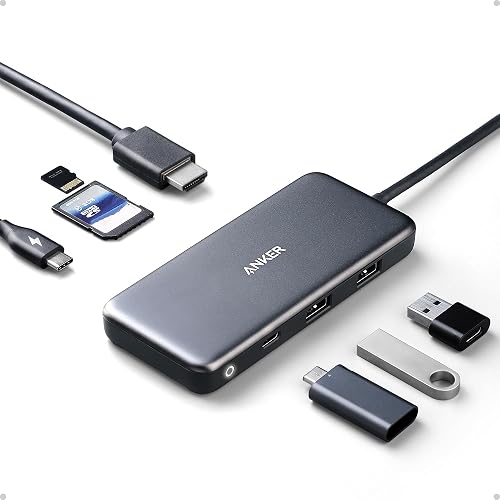
Anker 7-in-1 USB-C Hub
Modern laptops keep getting thinner, which means fewer ports. The Anker 7-in-1 USB-C Hub solves that problem: one cable gives you 4K HDMI, 2× USB-A 3.0 + 1× USB-C data ports, SD and microSD card readers, and 100W Power Delivery pass-through. Plug-and-play on Windows, Mac, and ChromeOS.
As an Amazon Associate, TechDealsGo earns from qualifying purchases.
✓ Pros
- Eliminates port anxiety on thin laptops in one purchase
- 100W PD means you never lose charging while the hub is connected
- Runs cool even with multiple devices connected simultaneously
- Small enough to live permanently in a laptop bag
- Plug-and-play on Windows, Mac, and ChromeOS — no drivers needed
✗ Cons
- 4K output limited to 30Hz — not ideal for high-refresh gaming
- Only one HDMI port — no dual-monitor support
- USB-A ports are 3.0, not 3.2
Specifications
| HDMI | 4K @ 30Hz |
| USB-A Ports | 2× USB-A 3.0 |
| USB-C Data Port | 1× USB-C (5Gbps) |
| Card Reader | SD + microSD |
| Power Delivery | 100W USB-C pass-through |
| OS Support | Windows, Mac, ChromeOS |
| Plug-and-Play | Yes — no drivers |
| Cable Length | ~12 inches |
Anker 7-in-1 vs the alternatives
If one monitor and everyday ports are enough, the Anker 7-in-1 is the value pick: its HDMI port runs a single display at up to 4K@30Hz, and its USB-C Power Delivery port passes up to 85W to your laptop when connected to a 100W PD charger (the hub itself uses 15W; charger not included). Data moves at up to 5Gbps through its USB-A and USB-C data ports, and the SD/microSD slots take cards up to 2TB. Compare it with the other hubs in our best USB-C hubs guide: the CalDigit TS4 is a Thunderbolt 4 desk dock for dual 4K displays and 98W charging, while the Hiearcool 7-in-1 is the most compact option for travel.
Frequently asked questions
Does the Anker 7-in-1 charge my laptop while I use it?
Yes — connect a 100W USB-C PD charger (not included) to the hub's PD port and it passes up to 85W to your laptop while you use the other ports.
Can I connect two monitors to this hub?
No. It has a single HDMI port, so it drives one external display at up to 4K@30Hz. If you need two monitors, a Thunderbolt 4 dock such as the CalDigit TS4 is the better fit.
Will it work with my MacBook?
Yes — it is plug-and-play on Windows, Mac and ChromeOS with no drivers. Your laptop's USB-C port needs to support DisplayPort Alt Mode and Power Delivery for the HDMI output and charging to work.